Jev in LangChain: a decision model for the choices your agent makes
TypeSafe AI's Jev answers typed questions with probabilities instead of writing text. What it is, where it beats an LLM, and how to use it from LangChain and LangGraph.
NectArray team · 26 September 2026 · 7 min read
Most of the calls an agent makes to a language model are small decisions. Is this ticket urgent? Which tool should run next? Does this page contain personal data? We send each of those questions to a model that can write an essay, wait a second or two for it to write a few tokens, and then parse the tokens back into a yes or a no.
Jev, released in September 2026 by TypeSafe AI, is built for exactly those questions. LangChain has published four posts about it in the past fortnight and shipped an integration package, langchain-typesafe. We have been reading through them because routing and guardrail calls are a large share of the model spend on the agents we build for clients. This article covers what Jev is, what LangChain's tests found, and how to wire it into a LangChain agent or a LangGraph workflow.
What Jev is
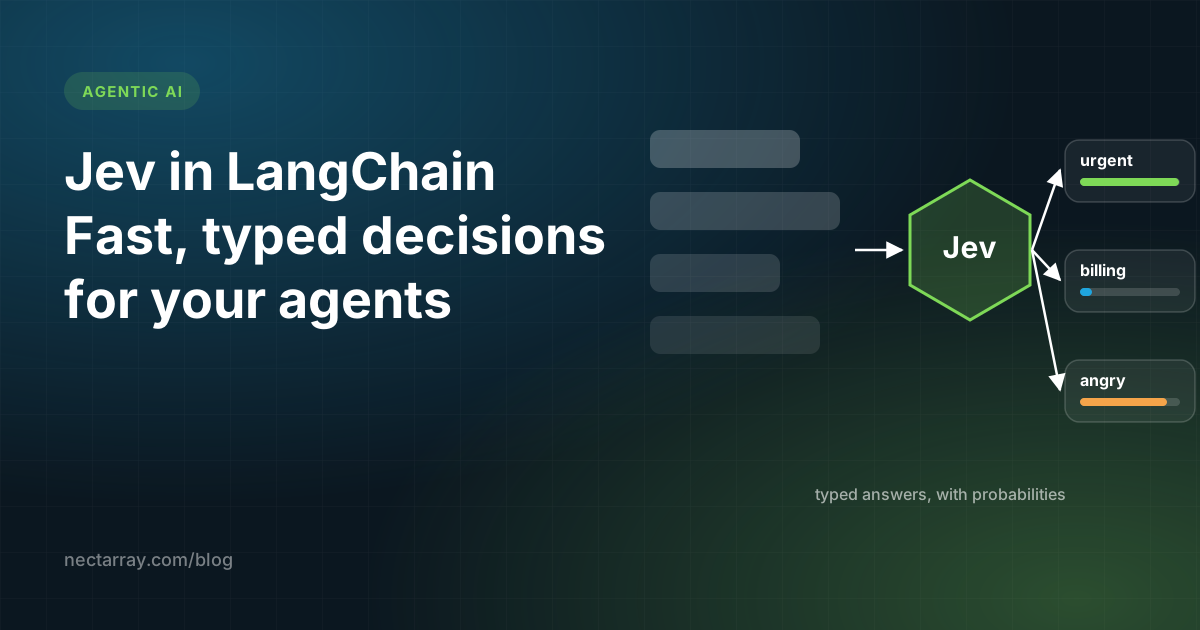
TypeSafe calls Jev a "System One model". It does not generate text. You give it a piece of state, such as a message, a page or a tool call, and a set of questions about that state. It returns a typed answer to each question with a probability attached.
There are three kinds of question:
| Type | What you ask | What comes back |
|---|---|---|
| Noul | A yes-or-no question | A probability between 0 and 1 |
| Choice | Pick one of several options | A probability for each option |
| Score | Rate against ordered levels, such as low, medium and high | The level, with probabilities |
Two properties make this useful inside an agent. Jev evaluates every question in a request in parallel, so asking five questions about a page costs little more time than asking one. It is also designed to give the same answer to the same input, which language models do not reliably do.
TypeSafe's own figures put Jev at up to 200 times faster and 400 times cheaper than comparable language models on classification tasks. Those are the vendor's numbers. LangChain's independent tests, below, are smaller but more concrete.
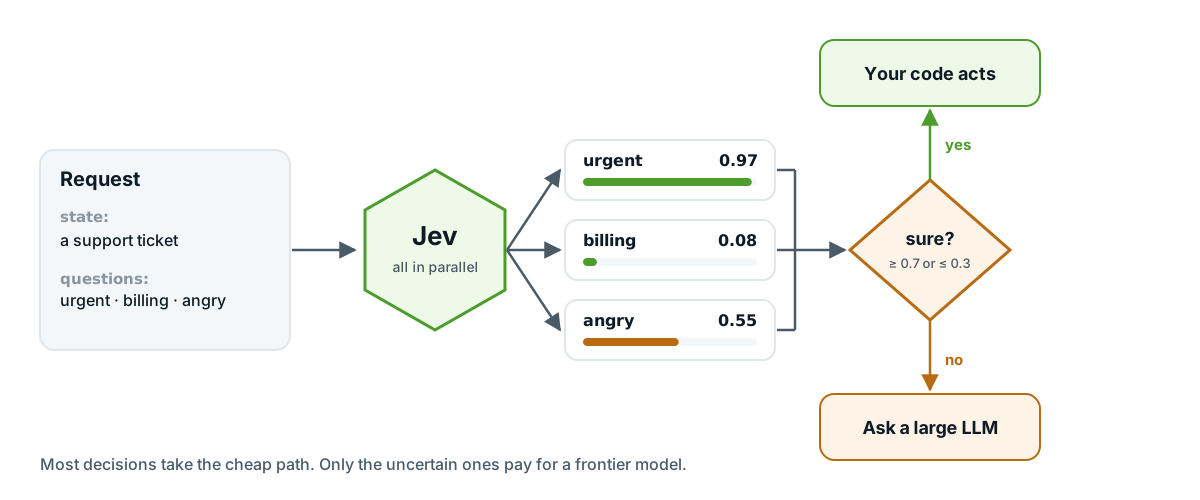 Cheap by default, frontier on exception: Jev takes the decision, and only uncertain cases go to a large model.
What LangChain's tests found
LangChain ran Jev in three settings, and the results are worth reading separately because they measure different things.
As an evaluation judge, Jev scored runs of a weather agent built with Deep Agents. On that test set it matched the expected pass or fail result every time, cost $0.00035 per call against $0.00568 for Claude Sonnet 4.6, and returned in about 0.44 seconds. The test set was five scenarios, so the accuracy figure says less than the cost and the variance do. The variance is the striking part: Jev's quality scores were between 92 and 913 times more stable across repeated runs than the LLM judges it was compared with.
In a document review workflow for litigation discovery, Jev answered three questions about every page: is it responsive to the request, does it contain personal information, and might it be privileged. It was 5 to 6 times faster than an LLM on that classification step, and its scores barely moved across 100 repeated runs.
In Browserbase's Stagehand, a browser automation tool, Jev picks the next action from the elements on a page. When its confidence is below 0.7 the decision goes to a language model instead. Median latency fell from 1.97 seconds to 0.46 seconds.
The pattern across all three is what LangChain calls "cheap by default, frontier on exception". A decision model handles the bounded questions, and a large model is called for the open-ended work and for the cases the decision model is unsure about.
Setting it up
Install the integration and set your API key:
pip install langchain-typesafe
export TYPESAFE_API_KEY="your-key-here"
Keep the key in your environment or a secrets manager. Never write it into the source file.
Asking your first question
This is the example from LangChain's own post. It asks one yes-or-no question about an incoming message:
from langchain_typesafe import Noul, TypeSafeClassifier

classifier = TypeSafeClassifier()

response = classifier.invoke({
    "state": (
        "The deploy failed twice and customers are seeing 500s. "
        "Can someone look now?"
    ),
    "questions": {
        "urgent": Noul(
            instructions="Does this need attention right now?"
        ),
    },
})

urgency = response.nouls["urgent"].noul
urgency is a probability. In TypeSafe's example of a similar support message the answer came back as 0.999. You decide what threshold counts as urgent, which is the main difference from asking an LLM: the model reports how sure it is, and your code makes the call.
Because questions run in parallel, you can ask several at once for almost the same price. Here is the same message checked for three things:
response = classifier.invoke({
    "state": ticket_text,
    "questions": {
        "urgent": Noul(instructions="Does this need attention right now?"),
        "billing": Noul(instructions="Is this about a payment or an invoice?"),
        "angry": Noul(instructions="Is the customer upset or threatening to leave?"),
    },
})

flags = {name: answer.noul for name, answer in response.nouls.items()}
Using it inside a LangChain agent
The integration ships two middlewares for create_agent. They are in an experimental module, so expect the interface to change.
Picking the model for each step
ModelRouterMiddleware uses Jev to choose which model handles each step of an agent. You describe the options in plain language, and Jev picks the cheapest one that fits:
from langchain.agents import create_agent
from langchain_typesafe.experimental.middleware import (
    ModelChoice,
    ModelRouterMiddleware,
)

router = ModelRouterMiddleware(
    choices={
        "fast": ModelChoice(
            model="openai:luna",
            criteria="Direct lookups, extraction, and localized changes.",
        ),
        "powerful": ModelChoice(
            model="openai:sol",
            criteria="Architecture and high-stakes decisions.",
        ),
    },
    instructions="Choose the least costly model that can complete the task.",
)

agent = create_agent("openai:gpt-5.6-luna", middleware=[router])
On most business agents we have seen, the majority of steps are lookups and extraction. If the router sends those to the small model, the savings add up quickly.
Stopping risky tool calls
AutoModeMiddleware checks each call to the tools you name and blocks the risky ones before they run:
from langchain.agents import create_agent
from langchain_typesafe.experimental.middleware import AutoModeMiddleware

guardrail = AutoModeMiddleware(tools=["bash"])
agent = create_agent("openai:gpt-5.6-luna", middleware=[guardrail])
A shell tool is the obvious candidate. The same idea applies to anything that sends email, moves money or deletes records.
Using it in a LangGraph workflow
LangGraph is where a decision model fits most naturally, because the graph already separates the steps. Your code owns the workflow, and Jev answers the questions at the branch points. The sketch below routes support tickets. It uses only the classifier call shown above and standard LangGraph, but treat it as a starting point: we wrote it for this article, and it is not from LangChain's posts.
from typing import TypedDict

from langgraph.graph import END, START, StateGraph
from langchain_typesafe import Noul, TypeSafeClassifier

classifier = TypeSafeClassifier()


class Ticket(TypedDict):
    text: str
    urgent: float
    route: str


def classify(state: Ticket) -> dict:
    response = classifier.invoke({
        "state": state["text"],
        "questions": {
            "urgent": Noul(instructions="Does this need attention right now?"),
        },
    })
    return {"urgent": response.nouls["urgent"].noul}


def pick_route(state: Ticket) -> str:
    if state["urgent"] >= 0.9:
        return "page_on_call"
    if state["urgent"] <= 0.2:
        return "queue"
    return "ask_llm"  # unsure, so a larger model reads it


graph = StateGraph(Ticket)
graph.add_node("classify", classify)
graph.add_node("page_on_call", page_on_call)
graph.add_node("queue", add_to_queue)
graph.add_node("ask_llm", llm_triage)
graph.add_edge(START, "classify")
graph.add_conditional_edges("classify", pick_route)
for node in ("page_on_call", "queue", "ask_llm"):
    graph.add_edge(node, END)

app = graph.compile()
The middle band is the part to tune. The wider you make it, the more tickets go to the expensive model, and the fewer mistakes the cheap path makes. Start wide, look at the traces for a week, and narrow it.
LangSmith has a dedicated view for decision models like Jev, which shows the inputs and the probabilities for each decision. That is how you find the right thresholds without guessing.
Where it fits and where it does not
Jev is a good fit wherever an agent asks the same kind of bounded question many times: routing, triage, tagging, approval checks, deciding whether a tool call is safe, and grading agent runs in an evaluation suite.
It does not replace the language model. It cannot write the reply to the customer, summarise the document or plan a multi-step task. In LangChain's document review example, pages with personal data still went to an LLM for redaction, and privileged pages still paused for a lawyer to review.
Two cautions. Jev is a few weeks old and the LangChain middlewares are marked experimental. And the headline speed and cost figures come from TypeSafe, so measure them on your own traffic before you plan a budget around them.
If you are building an agent now, the practical first step is small. Find the one question your agent asks an LLM most often, put Jev in front of it with a confidence threshold, and compare cost and latency in LangSmith after a week of real traffic.